Getting started
Everything you need to know before your first session: what ApexCoach is, how to log in, how to install it, and a quick tour of the interface.
What ApexCoach is
ApexCoach is a karting telemetry analysis tool. You take the file your data logger exports (AiM, Unipro, Alfano, RaceChrono) after a session, upload it, and the app does three things:
- Compares two laps meter by meter — where you gain, where you lose, and why.
- Shows you driving stats that don't show up just by looking at lap times: braking consistency, engine use, friction circle, session-to-session evolution.
- Generates a written coaching report, produced by an AI that reads those metrics and tells you plainly what to work on.
All the metric calculation and lap comparison happens in your browser, not on a server — it's instant and works offline. What does need internet is saving the session to your history and generating the AI report.
Create your access and log in
ApexCoach doesn't have open sign-up — access is granted by the team or consultancy admin (your coach). If you don't have a user yet:
- Ask your coach to set you up with your email.
- You'll get your credentials outside the app (WhatsApp, email).
- Go to
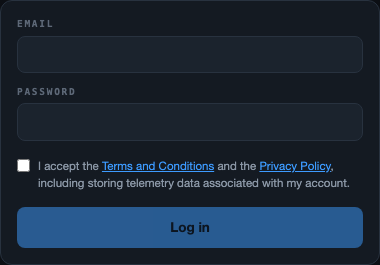
apexcoach44.comand log in with that email and password.
Forgot your password? Check I lost my access in the FAQ.
Install the app (PWA)
ApexCoach can be installed as its own app on your computer, without going through the App Store or Play Store. That gives you an icon at hand that opens in its own window, without browser tabs.
On a computer (Chrome or Edge)
- Go to
apexcoach44.com - Look for the install icon in the address bar (on the right, near the favorites star)
- Click "Install"

What works offline and what doesn't
| Works without internet | Needs internet |
|---|---|
| Upload and parse the CSV | Generate the AI report |
| Compare laps and view channels | Save the session to your history |
| Map, corners, friction circle | View Drivers, Team, Stats |
| Replay of an already-loaded session | Log in for the first time |
Interface tour
At the top you'll see 8 tabs. They're the 8 places where everything the app does lives:
- Analysis — the heart of the app. You upload the file here and compare laps.
- Corners — the same analysis but corner by corner, with braking, apex and exit detail.
- Replay — watch the lap "run" on the track map, like a sim racing replay.
- Drivers — the history of every saved session, by driver.
- Team — overall team status: standings by track, corner-by-corner dominance, evolution over time, and training goals per driver.
- Stats — overall numbers: how many sessions, how many reports, which tracks.
- Reports — the history of every AI report you've generated, so you can read them again whenever you want.
- Guide — the quick in-app help (this manual complements it with a lot more detail and screenshots).

Your profile, password and preferences aren't a tab — they open by tapping your email in the top right. More detail in Account & settings.
A typical session flow is: upload the file in Analysis → look at the comparison → generate the AI report → move on to another driver. The next sections follow that exact order.