Account & settings
It's not another tab — it's a panel that opens from the side, with 4 sections inside it.
How to open the panel
Tap your email, top right of the top bar. A panel slides in from the right, with its own 4 tabs: Profile, Preferences, Plan and Security. Close it with the ✕ at the top or by tapping outside the panel.
Profile
- Email — read-only, the one you log in with
- Name — a text field for your name or alias, with a "Save name" button
Preferences
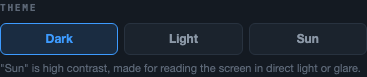
Theme
Three options — Dark (the usual one), Light and Sun (high contrast, built for reading the screen in direct light or glare, next to the track for example). It applies instantly across the whole app.
The defaults used every time you generate an AI report or upload a new session — you can always change these on the spot before generating a report:
- Default driver level — Low, Medium or High (Maximum is still locked, see AI report → Appreciation level)
- Default session goal — No preference, Save the tires or Chase time
Slip — default configuration
Front sprocket, rear sprocket and wheel diameter (in meters): applied automatically when you upload a new CSV, though you can always adjust it per session from the Analysis dashboard.
Plan and usage
- Beta Access — ACTIVE — while the app is in beta, you have full access with no restrictions
- Usage this month — how many AI reports you've generated in the current month
- Future plans — once they're rolled out, there will be three: Driver, Team Principal and Scuderia, with monthly report limits, extended history and multi-account access depending on the tier
Security
Change password
Two fields — new password (8 characters minimum) and its confirmation — plus the "Change password" button, which stays disabled until you fill in the field.
Danger zone
The "Delete account" button asks for confirmation before doing anything. It's a permanent action that erases all your data and saved sessions.